About Primordia
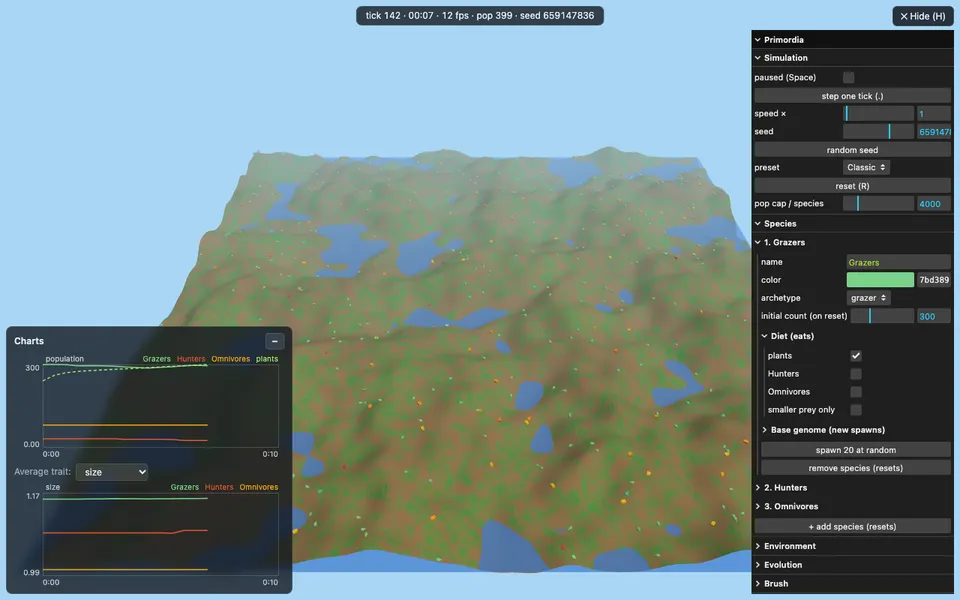
Primordia is an artificial-life sandbox rendered in 3D in the browser. It fills a small world with simulated organisms and leaves them to get on with living. Each organism carries a genome that shapes its traits, spends energy to survive and has a limited lifespan. Organisms hunt, and those that last long enough reproduce, passing their genome on to their offspring. Over many generations the population evolves, as the traits that help organisms survive become more common. More than one species can share the world, and live charts track how each population rises and falls over time. You can pick out an individual organism to inspect it and have the camera follow it around.
A run ends when a single lineage has taken over the world, and you can then reset and start again with a fresh world. A control panel lets you pause the simulation, step it forward one tick at a time, change its speed, and adjust settings such as the map size, water level, random seed and the species in play; some of these take effect on the next reset. Keyboard shortcuts cover the common actions: Space pauses and resumes, the period key steps forward, R resets the world and H shows or hides the panel. Primordia draws a full 3D scene and runs a continuous simulation, so a desktop or laptop is recommended.
What you can do
- A 3D world of organisms with genomes, energy and lifespans
- Hunting, reproduction and evolution across generations
- Live population charts for each species
- Inspect an individual organism and follow it with the camera
- Pause, single-step and speed controls, plus settings for the next world
How to use it
- Open Primordia on a desktop or laptop and let the first world start.
- Drag to move the camera and watch the population charts as species compete.
- Select an organism to inspect it and follow it around the world.
- Use the control panel, or press H, to pause, step, change speed or adjust settings.
- Press R to reset and start a new world once a lineage has taken over.
Controls: Mouse to move the camera and select organisms; Space to pause, period to step, R to reset, H for the control panel